
There is a very specific kind of engineering problem that does not show up in glossy vendor presentations, yet it shows up in real plants all the time. A machine is still running. A line is still producing. The controls hardware is older, but it remains critical to daily operations. Then someone on site needs to make a change, troubleshoot a fault, recover a program, or simply get online with the controller for the first time in years. In this case, that controller is a MicroLogix 1100. The engineer opens Rockwell’s download portal, searches for RSLogix 500, and immediately runs into friction. The search results are not as clear as they should be. The naming is inconsistent with what many practitioners expect. The most obvious path often points to the wrong package, a licensing requirement, or a version trail that does not actually lead to the files needed for this controller. What should be a simple software retrieval task often turns into an unnecessary support exercise.
That is the practical problem this article is meant to solve. It is not a theoretical discussion of software catalogs or product families. It is a field driven walkthrough built around the reality that many manufacturing teams still support legacy Allen Bradley platforms every day. MicroLogix controllers remain installed across packaging systems, skids, utility panels, small standalone machines, retrofit cells, and older process support assets. In many facilities, these controllers are not considered strategic, but they are still operationally important. When one of them needs attention, the team supporting it needs a fast and reliable path to the correct tools. Losing time inside a vendor portal, selecting the wrong software family, or getting blocked by an unexpected license prompt is more than an annoyance. It delays troubleshooting, creates uncertainty, and adds friction to work that is often already time sensitive.
This is also why the topic matters beyond a single download. Older PLC platforms tend to expose broader issues in maintenance strategy, documentation discipline, and lifecycle ownership. If a plant struggles to locate the correct software for a controller that is still in service, that is usually a signal that the installed base has not been fully rationalized, documented, or modernized. In other words, the software problem is often just the visible symptom. Underneath it, there may be larger questions around backup practices, programming standards, controller inventories, spare parts planning, and engineering support models. Those issues do not need to be solved in this article, but they are worth keeping in mind because they are common in real operating environments.
The goal here is straightforward. This article will clarify which software path is actually relevant for MicroLogix 1100 users, explain why the obvious RSLogix 500 search often leads people in the wrong direction, and show how to think about the free version of the software in the context of legacy Rockwell support. Just as importantly, it will do so in a way that reflects real industrial automation work. Supporting older systems is not unusual. It is part of the job. Plants do not replace every controller simply because a product line has aged, and engineers do not have the luxury of treating legacy hardware as someone else’s problem. They have to connect, diagnose, and move forward with the tools available.
For that reason, the discussion ahead is intentionally practical. We will focus on the path that saves time, reduces confusion, and helps engineers find the exact files they need for a MicroLogix 1100 environment. Along the way, we will also highlight why this type of issue appears so often in manufacturing and why teams that support mixed generation control systems need a more disciplined approach to software access and lifecycle management.

The first point of confusion is simple, but it is also the one that causes most of the wasted time. Engineers usually begin with the most obvious search term, which is RSLogix 500. That sounds correct on its face, because MicroLogix 1100 programming does sit within the broader RSLogix 500 world. The problem is that Rockwell separates the general RSLogix 500 product family from the more specific RSLogix Micro product path, and those two paths do not behave the same way when you are trying to retrieve the free software package for an older controller. Rockwell’s own support content distinguishes between RSLogix 500 Micro Starter, Developer, and Lite, and makes clear that the Lite version is a narrower offering than the paid variants.
In practice, that means a user can search for the “right” thing in a general sense and still end up on the wrong path from a download and licensing standpoint. Searching for RSLogix 500 tends to frame the problem around the broader software family, while the free path relevant to this article is tied to RSLogix Micro Starter Lite. That distinction matters because one route pushes the user toward the standard product and potential licensing friction, while the other route is the one that actually surfaces the MicroLogix 1100 compatible free package. The confusion is not that engineers do not know what software family they need. The confusion is that Rockwell’s product naming and download structure do not map cleanly to how most practitioners think about the task.
This is a common pattern in industrial software ecosystems. Vendor naming conventions evolve over time, product lines are segmented for commercial reasons, and download portals are structured around internal catalog logic rather than real plant floor workflows. The result is that someone supporting a running system is forced to translate between how the work is understood in the field and how the software is organized inside a vendor portal. That translation step is where many people lose time.
The deeper issue is not just search terminology. It is lifecycle mismatch. Legacy controllers often remain in production for years after the surrounding software ecosystem has changed. A MicroLogix 1100 may still be controlling a useful and economically viable machine, but the software associated with it may have been moved, reclassified, limited to specific versions, or partially buried behind compatibility filters and retired package workflows. That creates ambiguity even for capable engineers who know the hardware well.
This is normal in industrial automation. Plants keep assets in service for practical reasons. The machine still works, the process is validated, spare parts may still be available, and the business case for full replacement may not yet exist. Meanwhile, the software vendor continues to update support structures, reorganize portals, and prioritize newer platforms. The result is an awkward middle ground where the controller is still operationally important, but the path to the correct tools is no longer intuitive. That is not a sign of user error. It is a predictable consequence of long asset lifecycles interacting with evolving software distribution models.
It is also why these situations are rarely isolated. When a team struggles to locate the correct programming package for a controller that is still in active use, that usually points to a broader maintainability issue. Documentation may be incomplete. The software matrix for installed assets may not be centralized. Engineering backups may not be current. Workstations may have drifted away from the original support environment. In that sense, the download problem is often the first visible symptom of a larger legacy support challenge. It shows up at the moment of need, but the underlying issue has usually been building quietly for years.
It is important to narrow the scope clearly because this is another area where people make incorrect assumptions. The free RSLogix Micro Starter Lite path does apply to the MicroLogix 1100, but it does not apply universally across the MicroLogix family. Rockwell’s support content states that the Lite software is a free download and supports the MicroLogix 1000 and 1100, while support for the MicroLogix 1200, 1400, and 1500 sits outside that free Lite scope. Rockwell’s current Product Compatibility and Download Center search results also show the EN 8.30.00 listing specifically applying to 1763 Lxxx B 10.000 and 11.000, which aligns with the MicroLogix 1100 path discussed in this article.
That distinction matters more than it may seem. Many engineers remember “MicroLogix” as one family and assume the free download logic should be similar across all models. In reality, Rockwell draws product boundaries that affect what is free, what is licensed, and what is surfaced through a given search result. For someone supporting a MicroLogix 1100, the practical takeaway is straightforward: the relevant path is the RSLogix Micro Starter Lite route, and that is precisely why searching generically for RSLogix 500 can send you in the wrong direction. Stating that clearly at the outset removes a large amount of confusion before the user even begins navigating the download center.
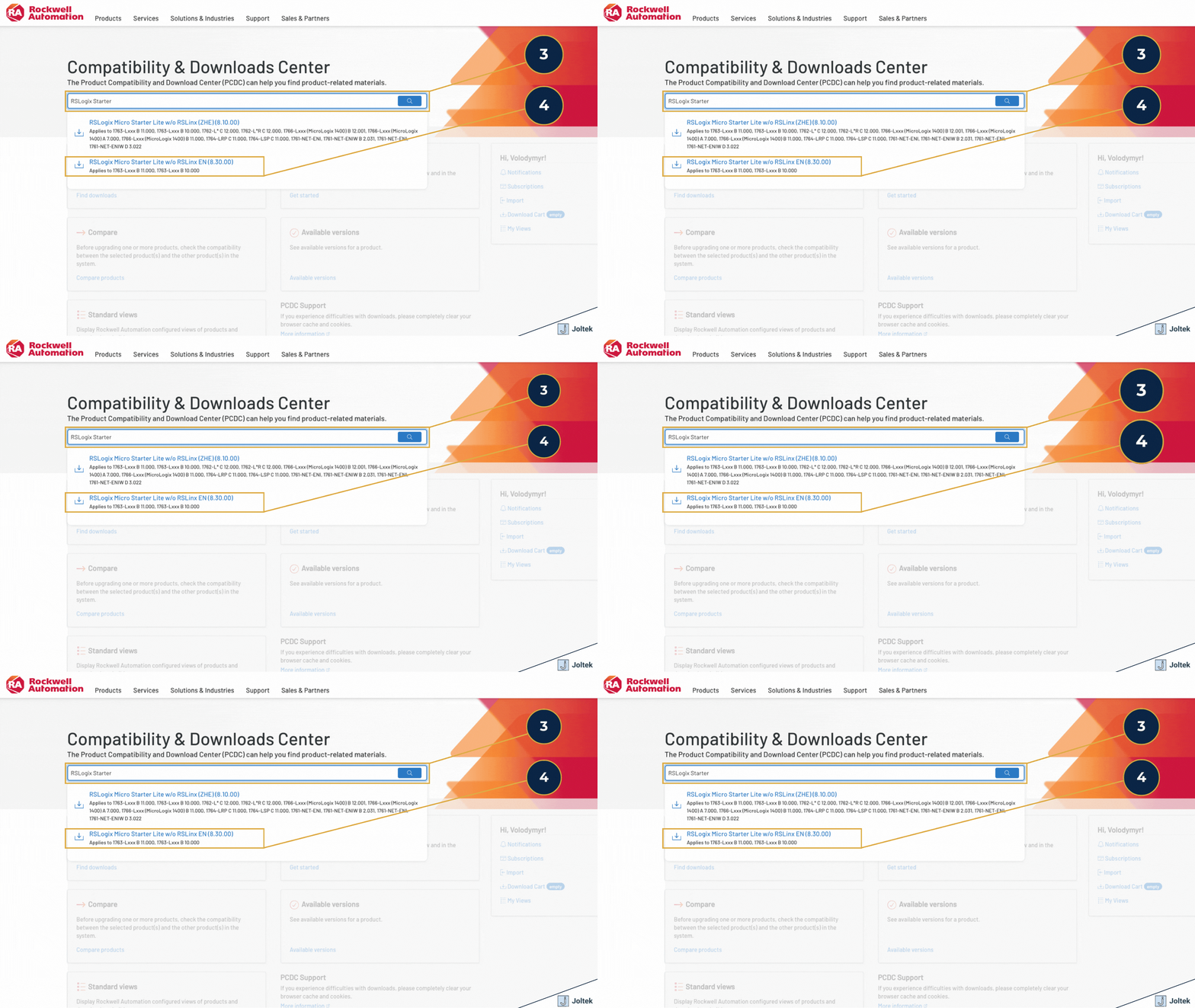
The most effective way to approach this process is to begin with the exact Rockwell portal intended for software compatibility and downloads, rather than treating the task like a generic software search. In practical terms, that means searching for the Rockwell Download Center, opening the official Product Compatibility and Download Center, and then searching for the Micro Starter entry specifically. This matters because the portal is structured around product families, versions, and compatibility relationships, not around the shorthand language most engineers use in conversation. When a user starts with “RSLogix 500” as the primary search term, the portal can pull them toward the broader software family and away from the narrower path that is actually relevant for a MicroLogix 1100. Rockwell’s own support content points users to the Product Compatibility and Download Center for RSLogix Micro Starter and related software, which confirms that the correct first move is to enter the official compatibility and download workflow rather than relying on a broad product search.
This sounds like a small distinction, but it has an outsized impact on whether the user finds the right package quickly. In many vendor ecosystems, product names are overloaded. A family name may be technically correct, but operationally unhelpful when the goal is to retrieve a very specific free package for a very specific controller. That is exactly the situation here. The cleanest path is to think less in terms of the overall RSLogix 500 umbrella and more in terms of the exact software entitlement attached to the MicroLogix 1100 use case. If the goal is to support a MicroLogix 1100 with the free software path, the search strategy should be built around RSLogix Micro Starter Lite inside Rockwell’s Product Compatibility and Download Center, not around the general RSLogix 500 label.
Once inside the Product Compatibility and Download Center, the next important step is to select the correct search result rather than assuming every similar looking item leads to the same destination. Rockwell’s public search results currently show “RSLogix Micro Starter Lite w/o RSLinx EN (8.30.00)” as an applicable item, and the listing specifically notes applicability to 1763 Lxxx B 10.000 and 11.000, which corresponds to the MicroLogix 1100 context discussed in this article. That is the result most readers will want to use because it aligns to the controller family and version range relevant to the free download path shown in the video.
The visible language options can create another layer of hesitation for users, especially when multiple entries appear under similar naming. In most cases, the English listing is the obvious choice for an English language workstation and installation workflow, but the more important point is to recognize that this is not just a language preference. It is a product result that anchors the user to the correct part of the Rockwell catalog. At that point, the user is no longer navigating abstract software families. They are working from a result that explicitly maps to the controller and version scope that matters. That is a materially better place to start, because it reduces the risk of drifting into a licensed package, an irrelevant version branch, or a result that looks close enough to be convincing but does not actually expose the right files.
This is the practical step that turns the process from confusing to productive. Finding the right search result is necessary, but it is not sufficient. The real value comes from opening “Available Downloads,” because that is what expands the actual file set and moves the user from a product listing into the software components that can actually be selected, reviewed, and downloaded. Many engineers stop too early, assuming that reaching the correct product page means they have already found the files. In reality, the product result is only the entry point. The actionable work begins when the available download set is expanded and the version specific files are surfaced.
That distinction is especially important in a legacy support workflow. Older platforms often live behind layered menus, version tables, and conditional file lists. If a user stays at the top level result, they may never see the actual package structure that determines whether the needed tools are present. By contrast, using “Available Downloads” exposes the deeper file relationships and sets up the next critical step, which is selecting the version branch that contains the software components relevant to the MicroLogix 1100 workflow. This is why the article and the video both emphasize that the objective is not merely to locate a product name in Rockwell’s portal. It is to get far enough into the file structure that the real software artifacts become visible and selectable.

This is the part of the workflow where most people conclude, incorrectly, that the software is no longer available. They arrive at the correct product family, open the version table, and naturally assume that the newest or uppermost version will contain the complete and most useful file set. In many modern software environments that assumption would be reasonable. In this case, it creates confusion. Rockwell’s Product Compatibility and Download Center shows the MicroLogix 1100 across a wide range of versions, including 16.000, 15.002, 15.000, 14.000, 13.000, 12.000, 11.000, and 10.000. That alone tells you the portal is organizing content around product and version history rather than around the simple question most users are asking, which is where the free files actually live for a MicroLogix 1100 support workflow.
The practical implication is important. Newer entries do not necessarily expose the exact bundle of files required for this legacy controller use case. That is why a user can be standing in the right part of the Rockwell portal and still feel as though the needed software has disappeared. The files are not necessarily missing from Rockwell’s ecosystem altogether. They are often sitting behind a different version branch than the one the user expected to open first. The central mistake is assuming that the newest visible version is automatically the correct version for legacy support work. In reality, legacy support often means matching the portal to the support scenario, not simply selecting the top entry on the page.
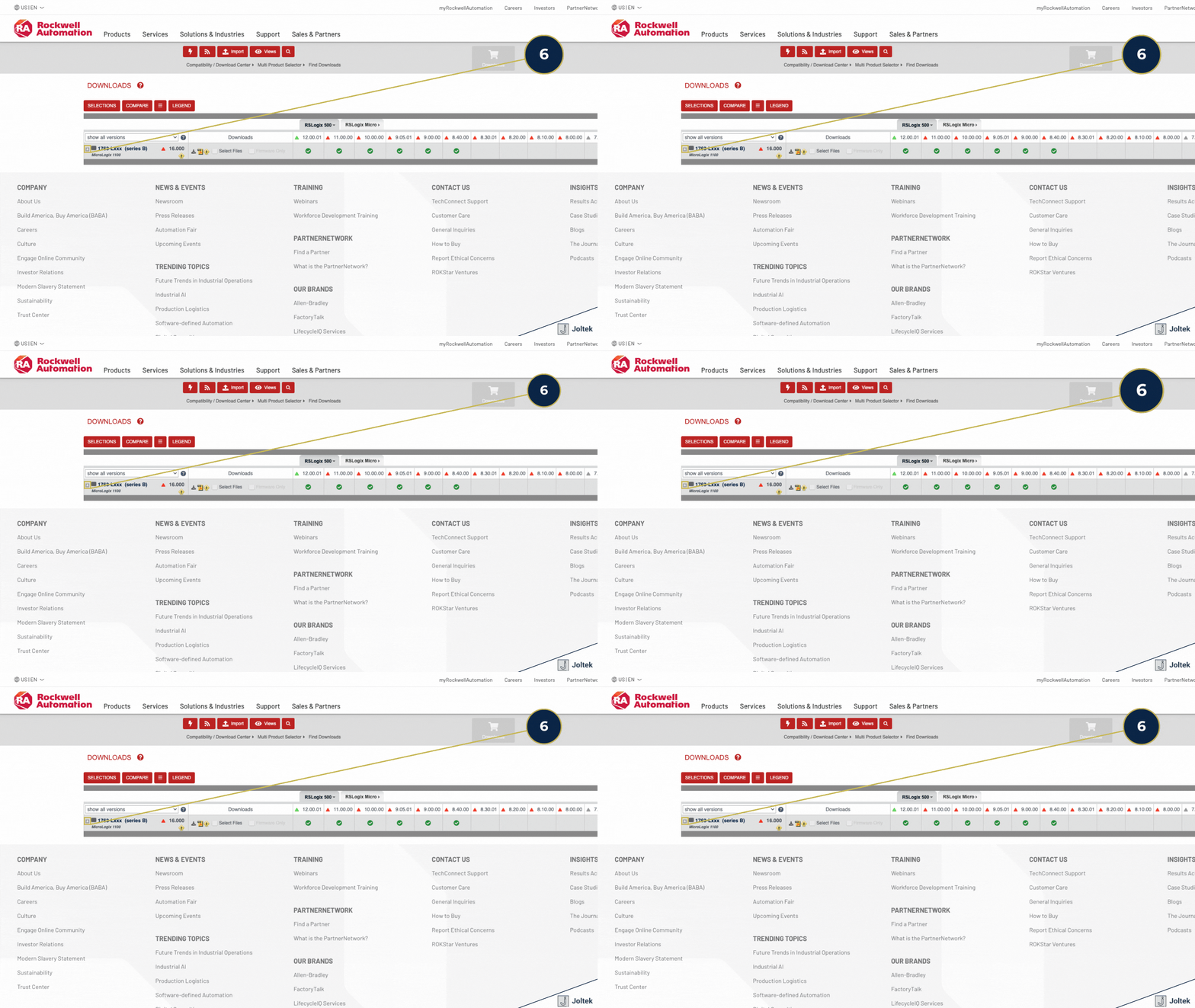
This is the specific insight that makes the entire process work. In the Rockwell version matrix for the 1763 Lxxx series B MicroLogix 1100, version 11.000 is still listed as a selectable branch within the Product Compatibility and Download Center. That matters because it is the version path used in the video to surface the file bundle needed for this controller workflow, and Rockwell’s current matrix confirms that 11.000 remains part of the downloadable version structure for the MicroLogix 1100.
From a field support perspective, version 11.000 is not interesting because it is somehow ideal in the abstract. It is interesting because it is where the download center structure aligns with the practical objective. When a technician or engineer needs the free tools associated with the MicroLogix 1100 support path, version 11.000 becomes the useful branch because it gets them closer to the actual software artifacts rather than just the broader version history table. This is a subtle but important lesson for anyone supporting legacy controls. The right version inside a vendor portal is not always the latest available one. It is the version branch that exposes the required support files for the hardware and software combination that still exists in the field.
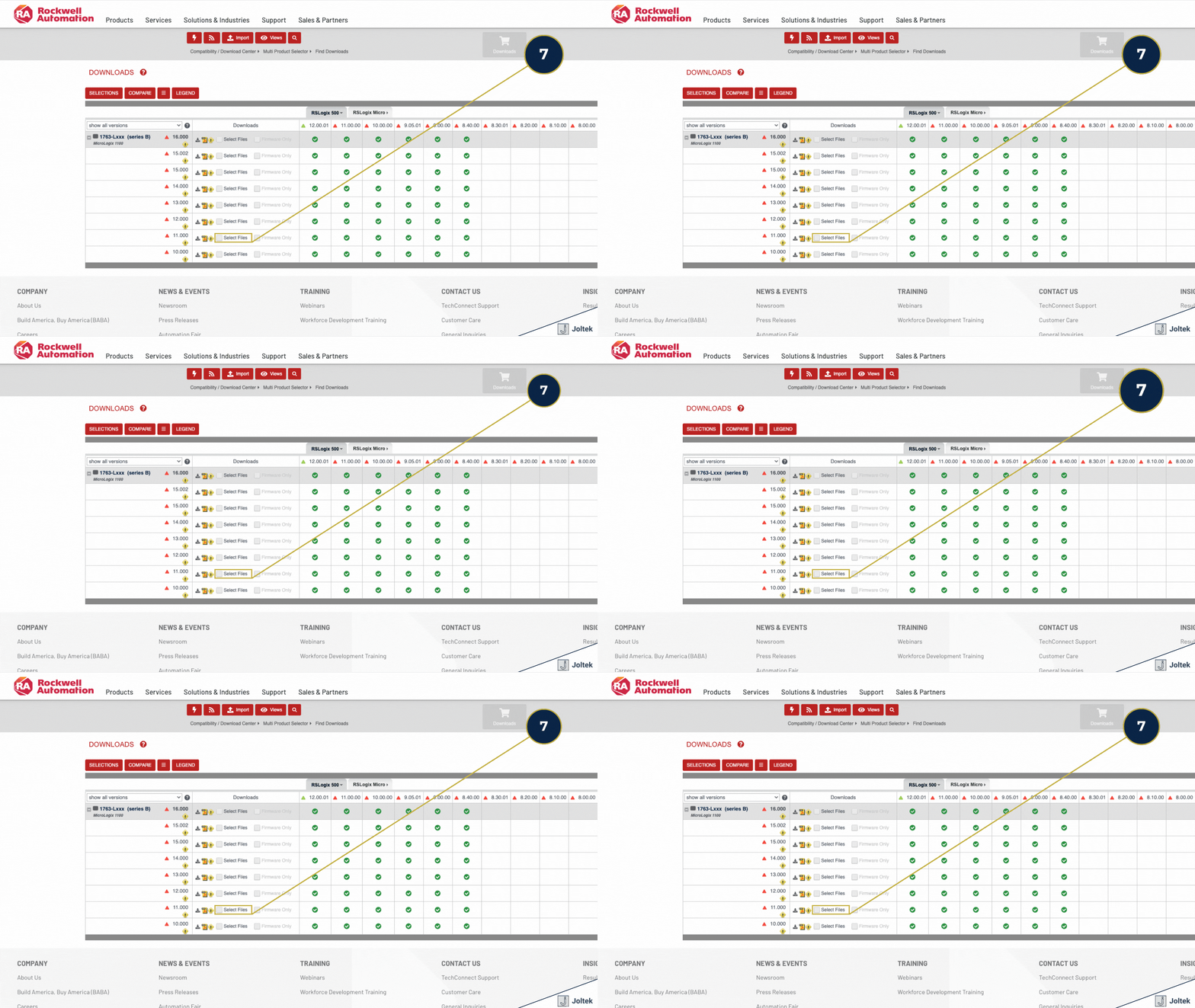
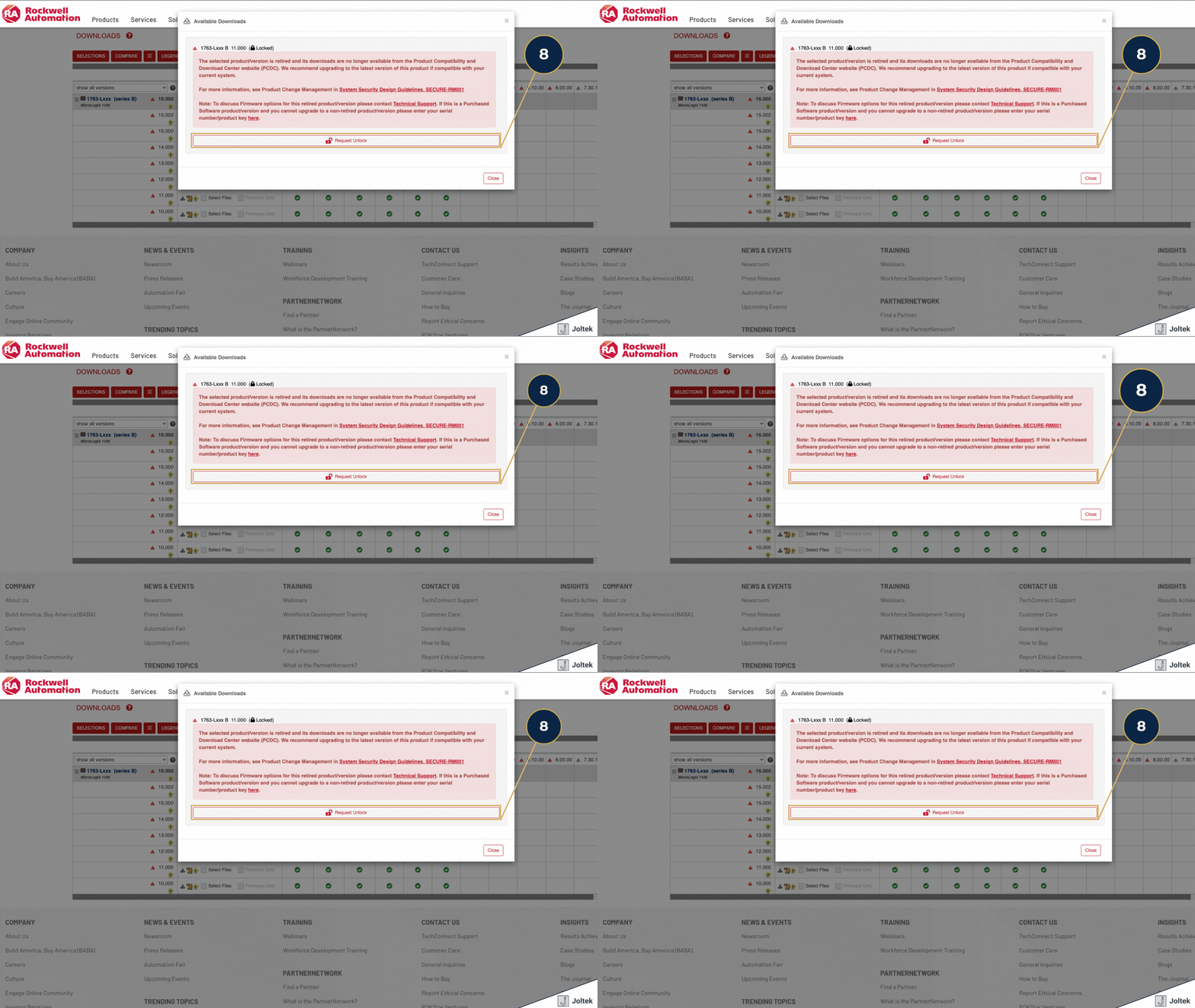
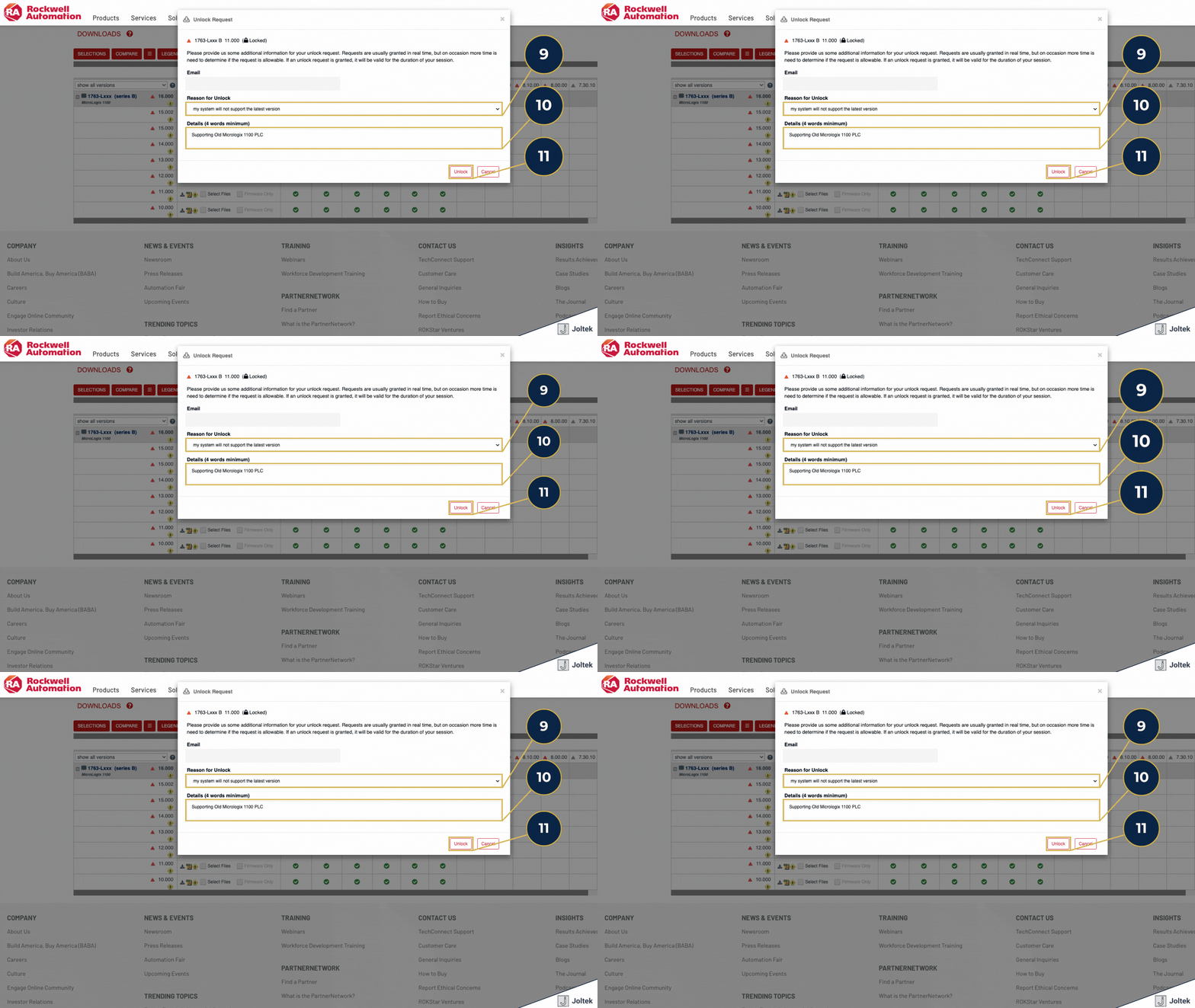
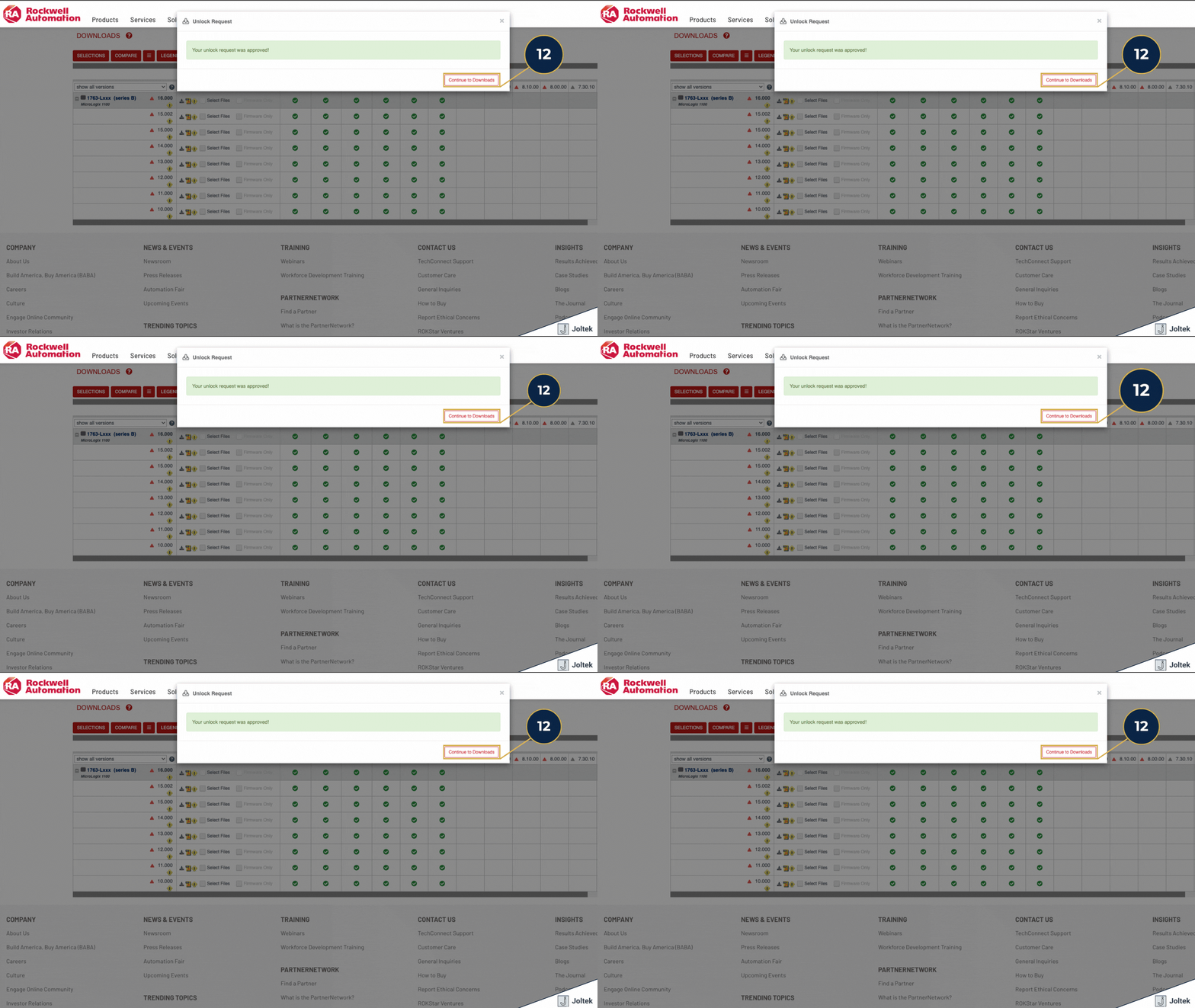
The unlock request is another point where users often assume they have made a mistake, when in fact they are simply colliding with the realities of older software lifecycle management. In the Rockwell download matrix, multiple MicroLogix 1100 version entries display an important notice icon alongside the selectable download actions. That pattern is a strong indicator that the user is interacting with older product content that Rockwell wants to contextualize before allowing access. In practical terms, the unlock step is less about user error and more about the vendor signaling that the package sits outside the most current mainstream support path.
For engineers in the field, the right way to interpret this is calmly and operationally. If you are supporting an installed controller that is older than Rockwell’s preferred current path, it is normal to encounter extra friction. An unlock prompt does not mean the software is invalid, nor does it mean the system should never have been supported this way. More often, it means you are working in the exact type of installed base environment that large manufacturers deal with every day, where the controller is still economically useful, still technically relevant, but no longer sits at the center of the vendor’s newest distribution model. The unlock step is simply part of accessing that older support layer.
This is where the conversation should move beyond downloading files and into plant level engineering discipline. Obsolete software does not automatically mean unusable software. In many facilities, older PLCs continue to run critical assets safely and productively for years. The real issue is not whether a controller is old. The real issue is whether the organization has a credible support model around that controller. If engineers are forced to search in real time for the correct programming package, decode vendor naming conventions, and work through legacy unlock paths under operational pressure, the plant is carrying maintainability risk whether it realizes it or not.
That risk usually extends far beyond one download event. It raises questions about whether the team has an accurate controller inventory, validated program backups, software version records, communications driver standards, laptop readiness, and a defined migration plan for aging assets. In that sense, the download issue is often just the first visible symptom of a larger lifecycle management problem. A well run plant does not only keep old equipment running. It also knows exactly how that equipment will be supported, what tools are required, who owns those tools, and what the eventual modernization path will be. This is one of the reasons we often encourage teams to think about legacy controllers not as isolated technical inconveniences, but as part of a broader architecture and maintainability discussion. Readers dealing with similar questions around PLC environments and broader automation stacks may also find this Joltek article useful: https://www.joltek.com/blog/manufacturing-concepts-edge-devices-plcs-ipcs-industrial-automation-software-hardware-architectures
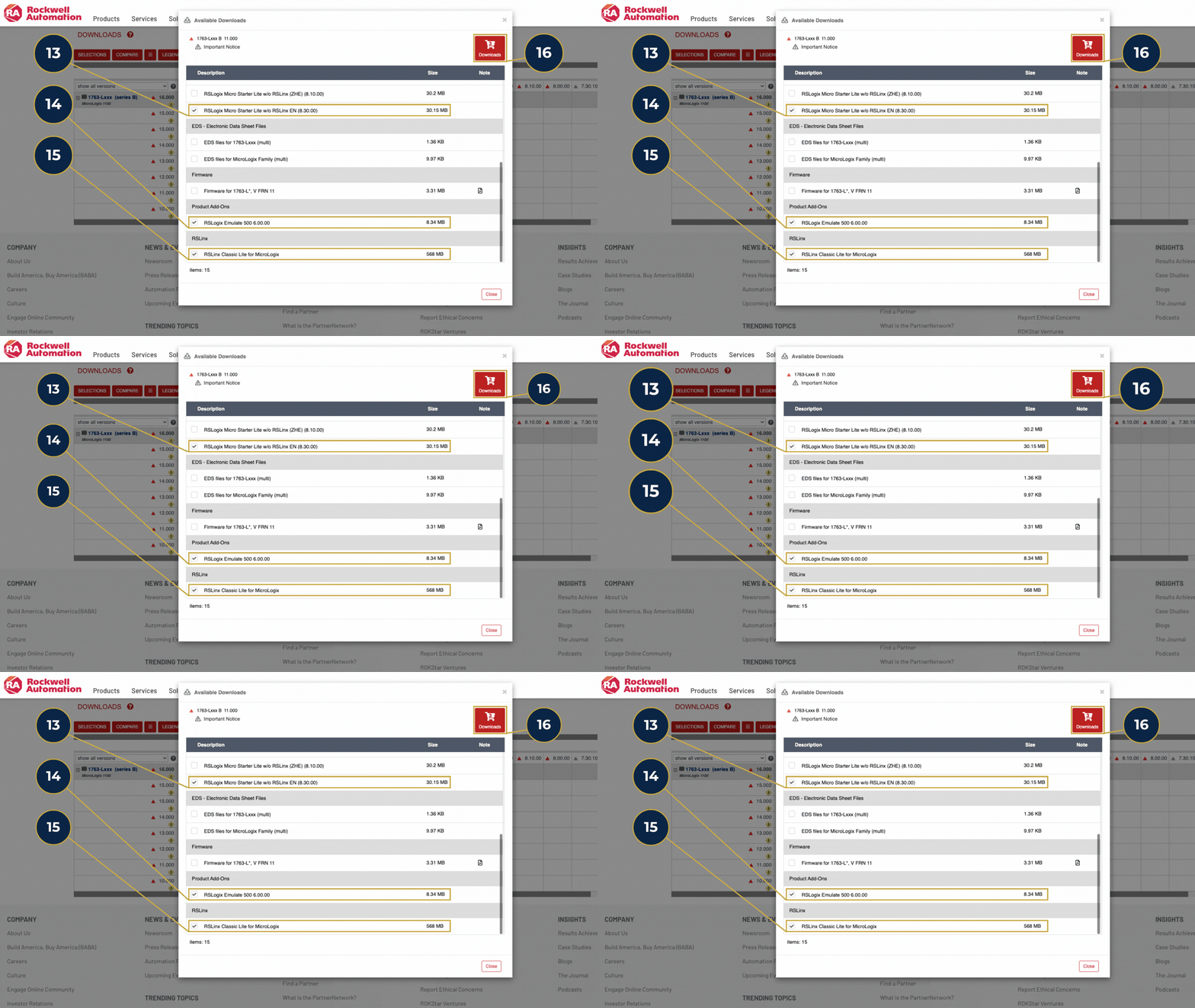
At the center of this workflow is RSLogix Micro Starter Lite. In plain language, this is the programming environment that allows an engineer or technician to open, review, edit, and download ladder logic for the supported MicroLogix controller range covered by the free software path. For a MicroLogix 1100, this is the primary application that gives you access to the controller logic itself. It is the software you use to go online, inspect the program structure, review instructions, make controlled changes, and work with the project file in a way that is consistent with day to day support activity on older Allen Bradley platforms. Rockwell’s own materials distinguish the Lite package from the broader paid RSLogix 500 offerings, which is exactly why it matters so much in this use case.
This is also where many users misinterpret the task. The objective is not simply to “get RSLogix 500.” The objective is to retrieve the specific programming environment that aligns with the free MicroLogix 1100 support path. That difference sounds small, but operationally it is the difference between landing in a usable toolchain and wasting time in the wrong part of the catalog. RSLogix Micro Starter Lite is the core software package that makes this free workflow possible for the MicroLogix 1100.
The second file is RSLinx Classic Lite, and this is best understood as the communications layer that sits between your workstation and the controller. If RSLogix Micro Starter Lite is the environment where you interact with the program, RSLinx Classic Lite is the tool that helps your computer discover the PLC, configure the appropriate communication driver, and establish the path that makes online access possible. Rockwell’s Getting Results guide for RSLogix 500 and RSLogix Micro states directly that RSLinx Classic Lite comes with these packages and provides the communication drivers necessary to use them.
That is a practical point worth emphasizing because many engineers assume the programming package alone is enough. In reality, a surprising amount of support time gets lost in communications setup rather than in the programming environment itself. If the PLC does not appear in your driver browser, if the Ethernet path is wrong, or if the workstation is not using the correct driver configuration, the programming software may be installed correctly and still remain unusable in practice. This is one reason legacy Allen Bradley support tends to frustrate occasional users. The toolchain has multiple layers, and communications is often the layer that creates the most friction. Readers who are working through broader PLC connectivity questions may also find this Joltek article useful: https://www.joltek.com/blog/connecting-allen-bradley-plc-ignition
The third file is RSLogix Emulate 500. Not every plant floor user needs emulation every day, and it is entirely possible to support a MicroLogix 1100 without using it on every job. That said, it remains a useful component in the toolkit because it gives engineers a way to work through logic behavior, test portions of a program offline, and build confidence before touching running equipment. Rockwell’s RSLogix Emulate documentation describes it as part of the software environment for working effectively with the emulator, which supports the broader purpose of offline familiarization and validation.
From a consulting and plant support perspective, emulation matters most when the cost of a mistake is high or when documentation is weak. If a team has inherited a project with limited notes, partial tribal knowledge, or uncertainty around how the logic behaves under certain conditions, even basic offline validation can reduce risk before someone connects to live hardware. It is not a substitute for a true commissioning environment, and it does not remove the need for disciplined change control, but it can be a valuable intermediate step between reading code blindly and making edits on a production asset. That is especially relevant in older systems where the original design intent may no longer be obvious from the program file alone.
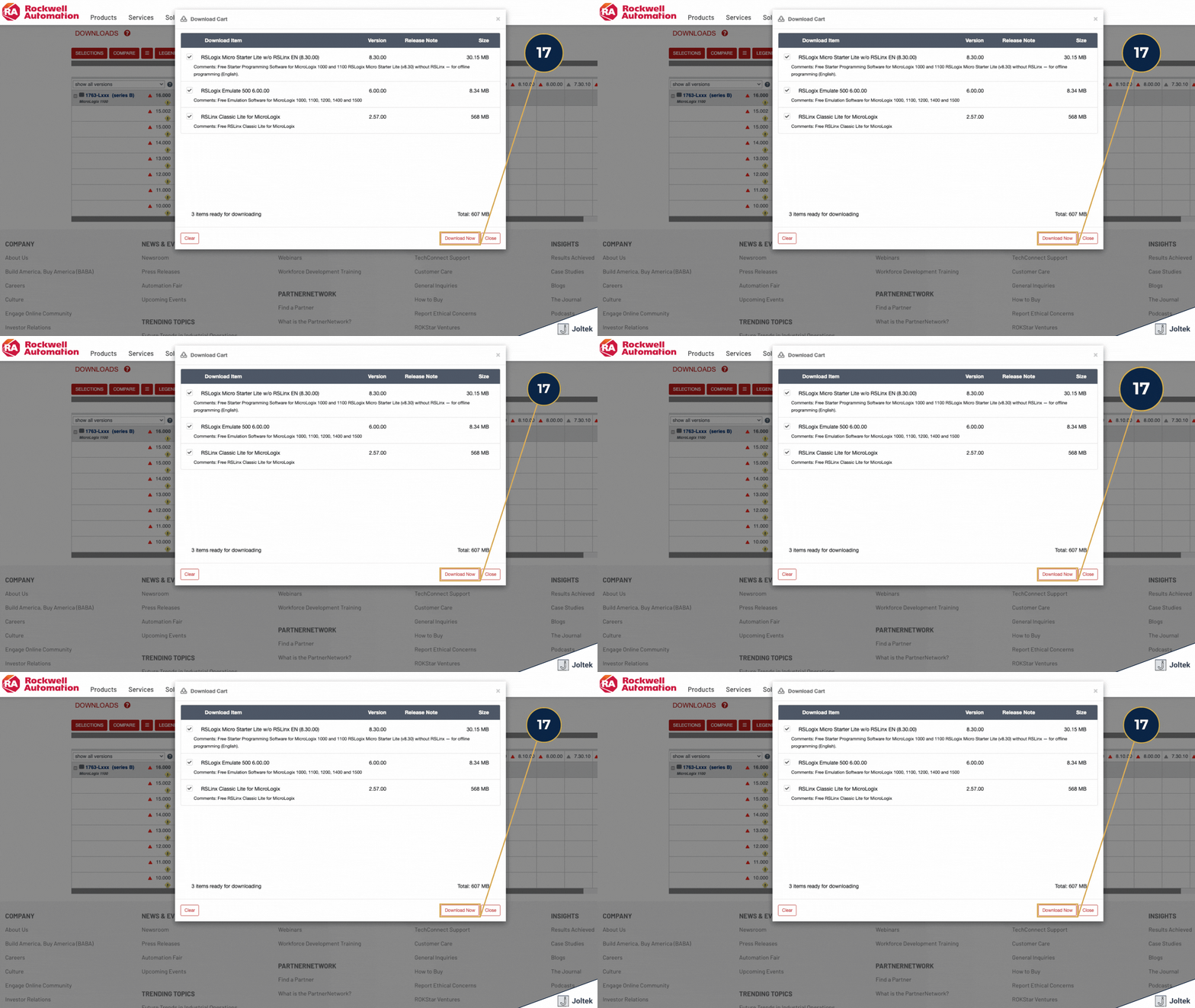
This is where it is important to be candid. Downloading the correct files is only the first step. It solves the software access problem, but it does not solve the broader set of issues that usually appear when someone is trying to support an older PLC under real operating conditions. It does not automatically resolve workstation to controller communications problems. It does not guarantee that the correct Ethernet or serial driver is configured. It does not fix firmware mismatches, missing archived project files, incomplete machine documentation, or uncertainty around whether the logic in the controller matches the latest saved program. And it certainly does not make online edits on a live production system safe by default. Those risks and constraints still need to be managed with engineering judgment and plant discipline.
In practical terms, this is where many teams lose more time than expected. They assume that once the download is complete, the hard part is over. In many cases, the opposite is true. The software retrieval issue is simply the gateway problem. The real complexity begins when the engineer has to connect to aging hardware, interpret an older codebase, decide whether the existing backup is trustworthy, and make changes in an environment where downtime, safety, and production continuity all matter. That is why legacy controller support should never be viewed as just a software problem. It is an execution problem, a documentation problem, and often a lifecycle management problem all at once. For readers thinking more broadly about how PLCs fit into the wider automation environment, this Joltek article provides a useful architectural lens: https://www.joltek.com/blog/plc-scan-cycles-polling-scada-systems-data
Supporting older Allen Bradley platforms is still part of modern manufacturing reality. That is true in brownfield plants, utility systems, packaging lines, process skids, and standalone machines that continue to deliver value long after they disappear from the center of a vendor’s product strategy. In that environment, the challenge is rarely the basic idea of the controller itself. Most experienced engineers can understand ladder logic, trace I O, and work through the control sequence. The real friction usually appears somewhere else. It appears in software access, in compatibility questions, in legacy version structures, in communications setup, and in knowing which vendor workflow still applies to a platform that is still running in the field but no longer sits on the front page of the product catalog. The real difficulty with legacy PLC support is usually not the controller logic. It is everything around the logic.
That is why a seemingly simple task like downloading the correct free version of RSLogix 500 for a MicroLogix 1100 can become unnecessarily time consuming. What should be a straightforward support action turns into a test of product naming, version awareness, portal navigation, and lifecycle knowledge. For plant teams, that matters because these issues never appear in isolation. When software retrieval becomes difficult, it often points to a wider opportunity to improve documentation, standardize support practices, validate backups, and think more deliberately about the future of aging assets across the site.
From Joltek’s perspective, this is exactly the kind of problem worth taking seriously. It sits at the intersection of plant floor urgency and broader systems thinking. On one hand, an engineer may simply need to get online with a MicroLogix 1100 and move the work forward. On the other hand, the fact that this task is difficult may indicate a larger gap in automation governance, lifecycle planning, or technical readiness. Both perspectives matter. Strong industrial support requires the ability to solve the immediate problem without losing sight of the architectural and operational issues sitting behind it.
If you are dealing with PLC support challenges, recovering older systems, navigating legacy Rockwell software, or thinking through a broader modernization effort, Joltek is built for exactly that kind of work. We understand the reality of inherited assets, mixed generation environments, and the practical decisions that engineering teams have to make when older control systems are still expected to perform. If your plant needs help with legacy system recovery, PLC support, modernization planning, or industrial software architecture, reach out.