
Insights
Remote Access to Plant Equipment: How Manufacturers Take Back Control of OEM and Integrator Access
OT remote access for manufacturers: the paths OEMs and integrators use today, who should own them, what to write in purchase specs, and which model fits.
Table of contents
It’s two in the morning and the filler is down. The OEM’s technician can fix it from home, if they can get in. In most plants that means a small box in the machine’s panel that the plant never bought, connecting to a cloud service the plant has never seen, with credentials that belong to someone at the OEM. It works. The question nobody asks at 2 AM is who else can get in the same way, and who decides.
Joltek’s position on OT remote access is simple. Remote access to plant equipment is necessary. Plants that try to ban it end up with worse workarounds, and they pay for every hour a technician spends driving to a fault they could have diagnosed in ten minutes. But it gets out of control quickly when every OEM, integrator and consultant installs their own system without the plant’s oversight. In most plants Joltek has assessed, that is exactly the situation: OEM remote access the plant neither holds nor controls, and no path of the plant’s own.
This guide is for the plant or engineering manager who owns the lines and is caught between the OEMs, corporate IT and their own on-call technicians. It covers:
- every path OEMs, line builders, integrators and your own people use to get in today
- why uncontrolled access is a plant problem, not just an IT problem
- what good remote access looks like, according to NIST, IEC 62443 and the 2026 government connectivity principles
- four remote access models, and which one fits your plant
- who should own, approve and revoke access
- what to write into machine purchase specs, so the problem stops growing
- how to bring the access you already have under plant control
What does remote access to plant equipment actually mean?
Remote access to plant equipment is any way someone who is not standing at the machine reaches its controller, HMI or engineering PC. That someone can be an OEM, a line builder, an integrator, a consultant or the plant’s own engineers. Viewing a machine and changing it are different risks. The real question isn’t whether to allow remote access, it’s who controls it.
The case for it is easy to make. An OEM technician who can see the machine’s alarms and logic diagnoses most faults faster than one who has to fly in. A plant engineer on call can check a stuck sensor from home instead of driving in. Remote monitoring is one of the first things Joltek’s founder recommends after a factory assessment, because so much maintenance time is spent getting to the machine rather than fixing it. In one late-night call the founder describes, the diagnosis took ten minutes. The travel took the rest.
The risk depends on what the session can do:
- Viewing alarms, trends and screens is the lowest risk.
- Changing setpoints, logic or HMI screens can stop production or create a safety hazard.
- Downloading to a running controller is the highest risk, and the hardest to undo if the connection drops halfway.
The industry has a reference for this. OMAC, the packaging machinery automation group, published its Practical Guide for Remote Access to Plant Equipment in 2021, a 90-page guide written by a 37-member workgroup of end users, machine builders and suppliers. It treats remote access as a plan the plant owns, starting from an honest look at the current state, and it gives legal liability its own section. For readers who are newer to how plant networks are built, Joltek’s free OT networking fundamentals course covers the groundwork this guide assumes.
How do OEMs, integrators and your own people get in today?
Most plants have more remote access paths than anyone has written down: OEM gateways in machine panels that call out to the builder’s cloud, line-builder VPN routers, cellular modems, remote desktop tools on HMI PCs, IT VPNs, and the occasional travel router. Many of them never pass through IT’s firewall. In SANS’s 2025 survey, 31% of organizations had no proper inventory of their remote access points.
These are the paths that turn up, and how each behaves:
| Path | Usually installed by | Crosses the plant firewall? | Who can switch it off | Typical reach |
|---|---|---|---|---|
| OEM cloud gateway (Ewon with Talk2m, Secomea, Tosi, IXON, Stratix 4300) | The machine builder | Usually, outbound to the builder’s cloud | Whoever holds the portal account, often the OEM | The machine network, sometimes more |
| Line-builder VPN router | The line builder | Yes, as a VPN tunnel | The line builder, unless agreed otherwise | The line or the machine |
| Cellular modem in the panel | OEM or integrator | No. It bypasses the firewall entirely | Whoever has the SIM and the portal | Whatever the panel is wired to |
| Remote desktop tool on an HMI or engineering PC (TeamViewer, AnyDesk, VNC) | OEM, integrator or plant technician | Usually, outbound | Whoever installed it | The PC, and everything the PC can reach |
| IT site-to-site or client VPN | Corporate IT | Yes | IT | Often far more than the machine |
| Travel router or tethered laptop | A commissioning engineer | No | Whoever brought it | The panel it is plugged into |
The OEM gateway is the most common. Ewon alone states it has more than 600,000 connected machines. Line builders bring their own as well: Krones places a Cisco router in the plant’s network cabin or directly in the machine for its remote service, and KHS runs remote diagnostics over a VPN for a single machine or a whole line. Every one of these works. The problem is the total. Claroty’s Team82 research (2024, vendor data) found 55% of organizations had four or more remote access tools on their OT networks, and a third had six or more.
Cellular modems deserve their own mention. CISA’s internet exposure guidance warns that “directly connecting PLCs to the internet through cellular modems can create significant security risks,” and a modem in a panel is invisible to every firewall the plant owns.
Some paths are temporary by intent. At one commissioning Joltek’s founder worked on, the panel was not yet on the plant network because IT had not assigned addresses. A small travel router and a jump box wired to the PLC bridged the gap, after the router’s default password was changed. That is a reasonable fix for a week. Left in place for a year, it is an unmanaged wireless access point into a control panel.
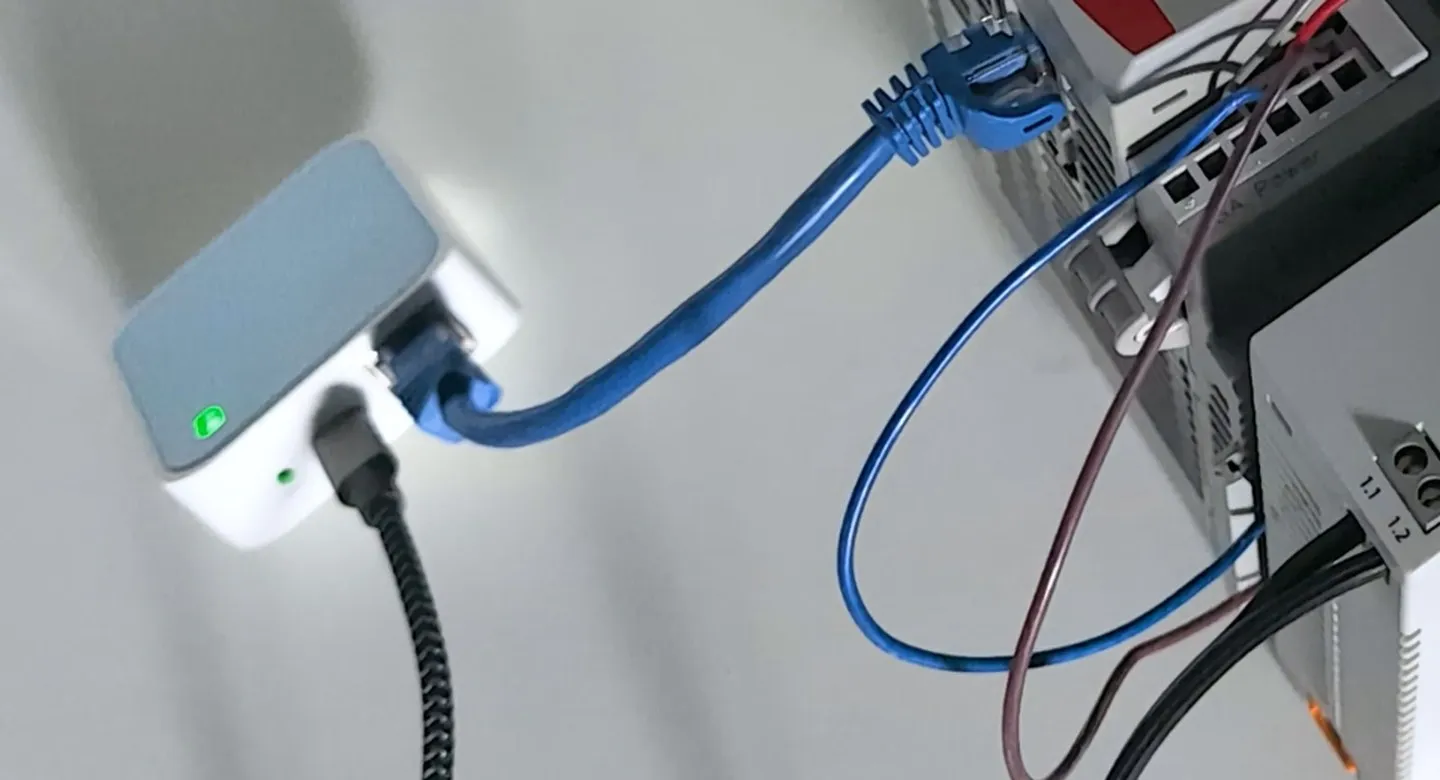
The pattern in most plants Joltek has assessed is the same: access the OEM holds and the plant doesn’t, nothing of the plant’s own, and nobody who can say how many paths exist. For the wider list of what a plant network should hold its vendors to, see the network requirements a modern plant should hold its vendors to.
Why is uncontrolled remote access a plant problem, not just an IT problem?
Because the consequences land on the line. An OEM tunnel into a flat network reaches every controller on it, not just the OEM’s machine. A remote change can land on a machine that is running, with people standing at it. And the attacks that have reached plant equipment came through these doors: internet-facing PLCs with default passwords and exposed HMIs.
Reach. The 2026 Secure Connectivity Principles for OT, led by the UK’s NCSC with CISA, the FBI and other agencies, put it plainly: in a flat OT network with vendor VPN access, “a contractor connecting their designated equipment could also gain access to all other devices on the network.” The OEM came to support one filler. Its tunnel can see the whole line.
Safety. NIST SP 800-82, the US government’s guide to OT security, says remote access “should not circumvent or negate safety or security controls.” A remote download to a machine someone is clearing a jam on is a safety question before it is a cybersecurity one.
Evidence. The incidents are real, if less dramatic than vendor marketing suggests:
- In November 2023, actors affiliated with Iran’s IRGC reached Unitronics PLCs at multiple US water facilities that were internet-facing and used default passwords or none (CISA AA23-335A).
- In December 2025, CISA reported pro-Russia hacktivists attacking through “minimally secured, internet-facing virtual network computing (VNC) connections” to HMIs, with Food and Agriculture among the targeted sectors (CISA AA25-343A).
- CISA, the FBI and the NSA have warned that attackers increasingly misuse legitimate remote access software (2023).
- The gateways are software too. In 2020 CISA published a CVSS 10.0 vulnerability in Secomea’s GateManager, since fixed.
- In SANS’s 2025 survey, half of the respondents who had an OT incident traced it to unauthorized external access.
None of this argues for cutting remote access off. It argues for knowing every path and owning the decision.
What does good OT remote access look like?
Good remote access has one path the plant owns. Connections start from inside the plant, never inbound. Every session has a named person with multi-factor authentication, reaches only the machine and protocol it needs, and closes itself when the window ends. Someone at the plant says yes or no, and there is a record of what happened. Standards and government guidance now agree on almost all of it.
| Principle | What it means on the floor | Where it comes from |
|---|---|---|
| One path the plant owns | Every vendor comes in the same way, through the plant’s own gateway, not their own | 2026 Secure Connectivity Principles: centralize access in the DMZ instead of a VPN per third party |
| Outbound only | Nothing on the plant side listens for connections from the internet | 2026 principles; NIST SP 800-82 Rev. 3 §6.2.10 |
| Named users and MFA | No shared logins; every person proves who they are | NIST §6.2.10 and §6.2.1.4; IEC 62443-3-3 |
| A defined reach | The session reaches one machine, one protocol, one port, and nothing else | IEC 62443-3-3 SR 1.13; least privilege |
| Just-in-time | Access is off by default and turned on for the job | 2026 principles; FBI and CISA, 2026 |
| Explicit approval | Someone at the plant approves each session | IEC 62443-3-3 SR 1.13 RE 1, “Explicit access request approval” |
| Disconnect | The plant can end a session immediately, and sessions end themselves | NIST §6.2.10; IEC 62443-3-3 SR 2.6 |
| Logging | There is a record of who connected, when and what changed. A recording is evidence, not prevention | NIST §3.3.7 and §6.2.10 |
| No standing back doors | Emergency access exists, but is not the everyday route | 2026 principles on break-glass access |
The two best starting points are the Secure Connectivity Principles for OT, published in January 2026, and NIST SP 800-82 Rev. 3, section 6.2.10. NIST released a Rev. 4 draft in September 2026, open for comment until November 30, 2026 (as of October 2026). Electric utilities have lived with most of these rules for years: NERC CIP-005 requires an intermediate system, multi-factor authentication, and the ability to see and cut off vendor sessions.
The guidance is settled. Practice isn’t. In SANS’s 2025 survey, only 30% of organizations had multi-factor authentication fully in place across every remote access point, 24% enforced a jump host everywhere, 13% had real-time approval, and 12% recorded sessions everywhere. Most plants know what good looks like. Few have built it.
Every principle in the table assumes the plant has somewhere to put a controlled path. For how that zone fits into a smaller plant’s network, see where the industrial DMZ sits in a small or medium plant.
Which remote access model fits your plant?
There are four models: OEM gateways that the builder runs, an IT VPN with a jump host in the industrial DMZ, a dedicated OT secure remote access platform, and general remote desktop tools. A single plant without a security team usually starts by putting OEM gateways behind its own firewall and building one plant-owned path. Multi-site companies tend to standardize on a platform.
| Model | Who usually buys it | Where it sits | Plant control | Effort | Fits |
|---|---|---|---|---|---|
| OEM gateway (Ewon, Secomea, Tosi, IXON, Stratix 4300) | The machine builder | In or beside the machine, calling out to the builder’s cloud | Low by default; higher if the plant holds the admin account | Low for the plant | Single machines; a step toward plant control |
| VPN with a jump host in the industrial DMZ | Plant IT | A remote desktop gateway or jump server between business and plant networks | High | Medium; needs IT partnership | Plants with an IT team and a DMZ |
| OT secure remote access platform (Claroty xDome Secure Access, Cisco Secure Equipment Access, Zscaler, Xona, Cyolo and others) | Corporate OT security or IT | A connector on site, a broker in the cloud or on premises | Highest: per-device, per-protocol, approvals, recording | Medium to high, plus licences | Multi-site companies, regulated sites |
| General remote desktop (TeamViewer, AnyDesk) | Whoever needs it | On individual PCs | Depends entirely on how it is managed | Low | A tool inside a controlled path, never the path itself |
OEM gateways have improved. Talk2m, Ewon’s cloud service, offers temporary users and connection audits, and Secomea sells role-based, time-limited access with session recording. Rockwell’s Stratix 4300 remote access router connects outbound only and has digital inputs to enable or restrict remote access at the machine. The weakness is not the box. It is that each OEM brings a different one, and the plant rarely holds the keys.
A VPN with a jump host is the pattern Cisco and Rockwell document in their Converged Plantwide Ethernet design guide (ENET-TD013A, 2022): no direct traffic between the business network and the plant, remote users come through the industrial DMZ firewall to a remote desktop gateway, with multi-factor authentication, and the rule is “Only One Path In or Out.” It works well where IT is a partner and the plant has, or is building, a DMZ.
Dedicated OT platforms all follow the same pattern: an outbound connector on site, access granted per device and per protocol, approval workflows, time windows and session recording. Joltek’s founder has deployed Claroty-based solutions at Kraft Heinz for many years. They earn their cost across many sites. For one plant they are often more than the problem needs.
General remote desktop tools are moving into OT; TeamViewer launched an agentless product for PLC and HMI access in late 2025. As a tool used inside a controlled, approved path, they are fine. As the path itself, installed once and left running, they are the riskiest item in the table.
For a single plant, the plant-owned path Joltek typically designs is modest: an industrial PC running Proxmox, hosting the jump and engineering virtual machines, in a DMZ VLAN between the business network and the plant VLANs. Vendors and engineers connect to that one point, with named accounts and multi-factor authentication, and reach only what each job needs. It costs a fraction of a platform, IT can support it, and it grows into a full industrial DMZ later. The zones and conduits behind it are covered in how zones, conduits and the jump host fit a brownfield segmentation plan.
Vendor names move quickly in this market; Tosibox renamed itself Tosi in 2025, and several platforms have changed owners. The models matter more than the brands.
Who should own remote access: IT, OT or the OEM?
The plant should own the decision, IT should run the infrastructure and identity, and the OEM should be a user. Someone at the plant, usually the engineering or maintenance lead on shift, approves each session, because they know whether the line is running and who is standing at the machine. Contractors should never control their own connections.
| Decision | Plant engineering | Shift lead / operations | IT | OEM or integrator |
|---|---|---|---|---|
| Approve a session | Accountable | Responsible (on shift) | Informed | Requests |
| Hold the admin account, credentials and SIMs | Accountable | Responsible | Never alone | |
| Add or remove a user | Accountable | Responsible | Requests | |
| Review the logs | Responsible | Consulted | ||
| Approve a new path or device | Accountable | Consulted | Proposes | |
| Set the contract terms | Responsible | Consulted | Agrees |
Plants with an OT security function add it as consulted on the last three rows.
The FBI and CISA make the approval point directly in their 2026 guidance on third-party integrators: “Ensure integrators access equipment using routes you are able to monitor. Use on-demand remote access if possible, so operators have to proactively allow remote access.” That is the opposite of an always-on box in the panel.
Ownership does not mean refusing. Contractors should never control their own connections, but every request should get a fair hearing: discussed, managed and risk-reduced, not ignored until someone plugs in a modem. When IT says “no VPN,” it often helps to make the request precise. Most modern gateways need only an outbound connection on port 443 to one named service, not an inbound firewall rule. Writing down which device, which port, for whom and until when turns a vague request into one IT can approve. As Joltek’s founder puts it, the reachable set is the whole argument.
What should your machine purchase specs say about remote access?
The cheapest moment to control remote access is before the purchase order. A machine spec should say how the builder will connect, that the plant owns the credentials and can switch access off at the machine, which devices and ports are reachable, how sessions are logged, what it costs over the machine’s life, and that no cellular modem goes in without written approval.
Every OEM gateway in a plant arrived the same way: as part of a machine, specified by the builder, approved by nobody. By the time the machine is on the floor, the box is installed, the subscription is in the builder’s name, and changing it means renegotiating a service agreement. Before the purchase order, the same request is one paragraph in a specification, and the builder prices it in.
The FBI and CISA make the same point in their 2026 integrator guidance: contracts should spell out remote access capabilities. OMAC’s remote access guide gives legal liability its own section, because who is responsible when a remote session goes wrong is a contract question before it is a technical one.
Ten clauses cover almost every case:
- Declared method. The builder states in its proposal exactly how it will connect remotely, including hardware, software, cloud service and who hosts it. Or it agrees to use the plant’s own remote access path.
- Outbound only, behind the plant firewall. Any remote access device connects outbound, sits inside a zone the plant controls, and needs no inbound firewall rule.
- No cellular or wireless without written approval. No cellular modem, Wi-Fi radio or other independent internet connection goes into the machine without the plant’s written approval.
- Plant-owned administration. The plant holds the administrator account for the device and its cloud portal, and the builder’s people are added as users.
- Named users and MFA. Every person who connects has their own account with multi-factor authentication. No shared logins.
- Local enable. Remote access can be switched on and off at the machine, by a key switch or an input to the gateway, and the machine shows when a session is active. Some gateways already support this, such as the digital inputs on Rockwell’s Stratix 4300 that “enable or restrict remote availability.”
- Defined reach. The spec lists which devices and ports the builder can reach, normally its own controller and HMI, and nothing else on the plant network.
- Logs for the plant. Session logs, and recordings where the tool supports them, are available to the plant on request or by direct access.
- Lifecycle and cost. The builder states the subscription cost, who pays it, the support term, and what happens when the gateway or its cloud service reaches end of life.
- Tested and handed over. Remote access is demonstrated at the factory acceptance test, and the handover package documents the device, accounts and network settings.
None of this is unusual to ask. Tetra Pak’s automation remote support already works over the customer’s existing remote connection, with support hours logged and actions recorded. Gateway makers have added the controls these clauses need, from temporary users to time-limited, recorded sessions. When a builder pushes back on the list, the reason is worth hearing, and the list is also a fair test of whether its support model was built for the plant or for itself.
The clauses belong in two places: the machine purchase specification, and the integrator’s scope of work when a third party is doing the controls. For the second, see writing remote access into an integrator’s scope of work. For the first, the factory acceptance test is where the clauses get proved; see testing remote access at the factory acceptance test.
How do you bring existing OEM access under plant control?
In five steps: list every path, ask each OEM to describe in writing how it connects, close anything exposed to the internet, move OEM gateways behind the plant firewall into their own zone, then route new and renewed access through one plant-controlled path. Don’t ban remote access along the way. The workarounds that follow a ban are worse than what you started with.
- List every path. Walk the panels, check the network for gateways and remote desktop software, and ask maintenance what they use at night. Include cellular modems and anything on HMI PCs. IEC 62443-3-2 starts in the same place: identify the system’s perimeter and its access points.
- Ask each OEM in writing. One short letter: how do you connect, with what device, through what service, who holds the account, and what can you reach? The answers, and the OEMs that cannot answer, set the priorities.
- Close internet exposure first. Anything reachable directly from the internet, any default password, any always-on remote desktop install, gets fixed before anything else.
- Put gateways behind the firewall, in their own zone. An OEM box that must stay can sit in a segment that reaches only its own machine, with the plant holding the admin account. IEC 62443-3-2 asks for devices connected through external networks to be separated in exactly this way.
- Centralize. Build the plant’s own path and move vendors onto it as service contracts renew, machines are upgraded and new equipment is bought. The 2026 connectivity principles recommend exactly this: one hardened access path across multiple vendors, instead of a separate VPN for each.
The order matters. Steps one to three cost little and remove the worst exposure in weeks. Steps four and five take months and ride on renewal dates, which is why they go in the purchase spec and the service contract rather than a one-off project. An OT network assessment starts with exactly this inventory.
How should your own engineers get remote access?
The same way vendors do: named accounts, multi-factor authentication, a defined reach and logged sessions. Plant engineers usually get a separate engineering path, because they need more machines and they need it at 2 AM. Outside consultants should come in through the plant’s path, never bring their own.
The plant’s own people are usually forgotten in remote access policies, which push them to quiet workarounds: a remote desktop tool on the engineering PC, a personal hotspot, a password shared with the night shift. Giving them a proper path, often a dedicated engineering virtual machine behind the plant’s jump point, removes the reason for all three.
Commissioning is the special case. Before a machine is on the plant network, engineers bridge the gap with whatever works, often a travel router and a jump box. That is acceptable for the commissioning window, with default passwords changed, and it should come out the day the machine joins the plant network.
Consultants are held to the same rule. Joltek connects to client plants only through the client’s own controlled path: time-bound sessions protected by multi-factor authentication and a hardware security key, no persistent connections left behind, and a backup taken before any change. Before any remote change, it is also worth confirming the device is the one you think it is; see verifying you are on the right device before a remote change.
What does remote access cost, and who pays?
Costs sit in four places: OEM subscriptions, usually paid by the builder and folded into service contracts; cellular data; licences for any plant platform; and the internal time to run approvals and reviews. The cost that rarely gets counted is the drive to site and the downtime while nobody can get in.
The OEM’s costs come back to the plant eventually, in the service contract. A plant-owned path built on an industrial PC and the plant’s existing firewall costs little in hardware; most of its cost is setup and someone’s time to run approvals. A dedicated platform adds licences that make most sense across many sites. Clause nine of the purchase spec exists so that none of this is a surprise three years after the machine arrives.
Frequently asked questions
Is a VPN enough for OT remote access?
No. A VPN is a tunnel, not a control. On its own it often lands the user on a flat network where they can reach far more than the machine they came to support. A VPN works as part of a controlled path: it ends at a jump point in a separate zone, every user has a named account with multi-factor authentication, access is limited to specific devices and ports, and sessions are approved and logged.
Is TeamViewer safe on an HMI or engineering PC?
As an always-on, unattended install that the plant does not manage, it is one of the riskiest paths into a plant. CISA has warned that attackers increasingly misuse legitimate remote access tools like it. Used inside a controlled path, with named accounts, multi-factor authentication, sessions the plant approves and turns off afterwards, and logging, a remote desktop tool can be a reasonable way to work on a single machine.
Should we let OEMs use their own remote access box?
Often yes, on the plant’s terms. The box should sit behind the plant firewall in its own zone, connect outbound only, reach only the OEM’s own machine, and be switchable off at the machine. The plant should hold the administrator account. A box with its own cellular connection, or credentials only the OEM holds, should be replaced or brought under these rules at the next service renewal.
Do we need a DMZ for remote access?
Eventually, yes. The current guidance from NIST, IEC 62443 and the 2026 government connectivity principles all point to remote access ending in a separate zone between the business network and the plant. A single plant without one can start smaller: one plant-owned jump point in its own network segment, with every vendor routed through it. That becomes the core of a proper industrial DMZ later.
Should remote access be allowed to change a running machine?
Only with someone at the machine who knows the session is happening and can stop it. Viewing a machine remotely is low risk; changing logic or downloading to a running machine is not. NIST says remote access should not circumvent safety controls. A practical rule is to require local consent, by a key switch or a call to the shift lead, before any remote change to running equipment.
Remote access is a plant decision
OT remote access isn’t going away, and it shouldn’t. It saves real downtime and real travel. The problem is never the technology. It is that the plant stopped deciding who gets in, and every OEM, integrator and consultant filled the gap with their own box. Taking it back doesn’t start with a platform. It starts with a list.
This week, list every remote access path into your plant, and ask each OEM to describe in writing how it connects. If the list is longer than you expected, Joltek’s assessment work starts there: every path, who controls it, and a plan to bring it under one plant-owned route. Send Joltek the situation.
Photo credits: header photo by Roger Starnes Sr on Unsplash, with site signage blurred. Travel router photo: Joltek, from the Factory Field Notes episode on wireless PLC access.
References and further reading
- Secure Connectivity Principles for Operational Technology (OT) · UK NCSC with CISA, FBI and international partnersJanuary 2026. Outbound-only connections, brokered vendor access through a DMZ, just-in-time access.
- NIST SP 800-82 Rev. 3, Guide to Operational Technology (OT) Security · National Institute of Standards and TechnologySection 6.2.10 covers remote access. A Rev. 4 draft is open for comment until November 30, 2026.
- Considerations for Critical Infrastructure Operators Working With Third-Party ICS Integrators · FBI and CISASeptember 2026. Monitorable routes, on-demand access, and remote access in contracts.
- Practical Guide for Remote Access to Plant Equipment · OMAC (Organization for Machine Automation and Control)A 90-page industry guide from a 37-member workgroup, released in 2021.
- IEC 62443 mappings for asset owners, product suppliers and service providers (SR 1.13, Access via untrusted networks) · ISA Global Cybersecurity Alliance and Industry IoT Consortium
- Securely Traversing IACS Data across the IDMZ Using Cisco Firepower Threat Defense (ENET-TD013A-EN-P) · Cisco and Rockwell AutomationThe CPwE reference design for remote access through the industrial DMZ, 2022.
- SANS State of ICS/OT Security 2025 · SANS Institute